Photoshop制作可愛的糖果餅干字【英】(3)
文章來源于 Tutsplus,感謝作者 Rose 給我們帶來經精彩的文章!Step 2
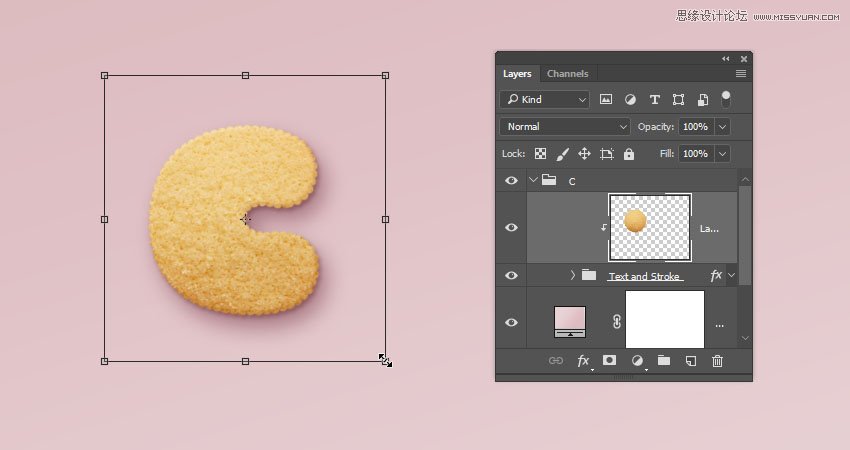
Go back to the original document and go to Edit > Paste to paste the copied biscuit texture.
Place the pasted layer inside the letter's group on top of the Text and Stroke group. Then, right-click the biscuit texture layer, and choose Create Clipping Mask.
Press Command-T to enter Free Transform Mode, and resize and rotate the texture until you like how it looks.
Hit Return to commit the changes.
6. How to Contract a Selection
Step 1
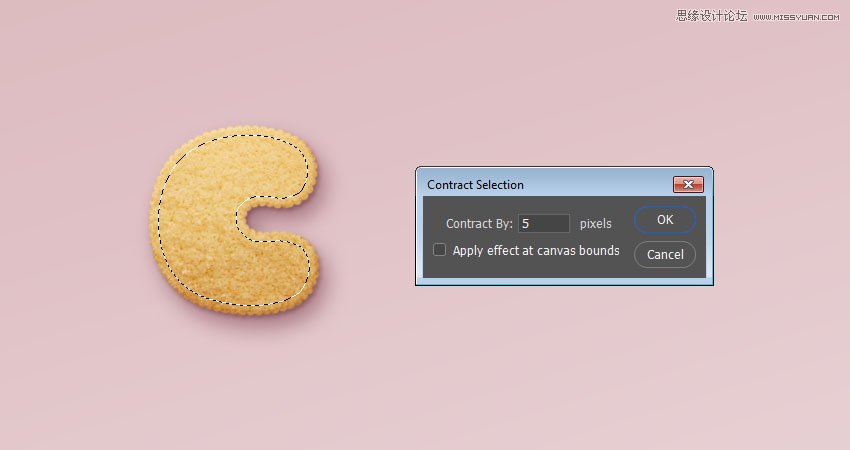
Command-click the text layer's thumbnail to create a selection.

Step 2
Go to Select > Modify > Contract, and change the Contract By value to 5.
Step 3
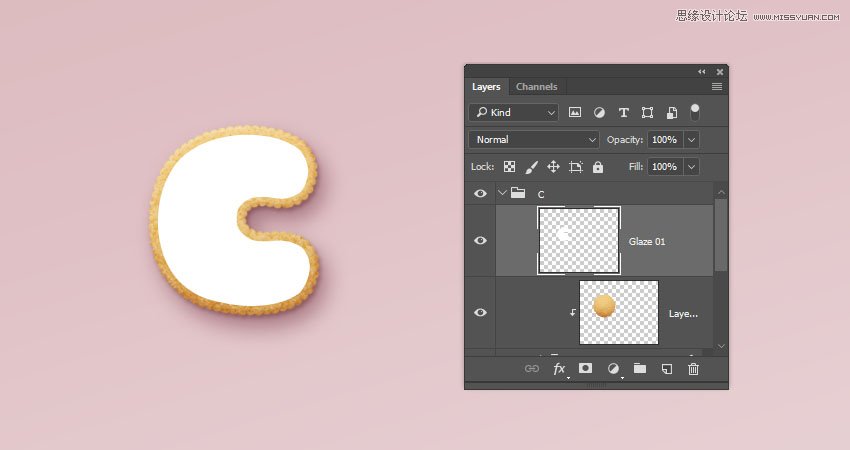
Create a new layer at the top of the letter's group and name it Glaze 01.
Fill the selection with White, and press Command-D to deselect.
Step 4
Duplicate the Glaze 01 layer and name the copy Glaze 02, and change the copy's Fill value to 0.

Step 5
Place both glaze layers in a group and name it Glaze.

 情非得已
情非得已
-
 Photoshop制作復古風格的老照片效果【英】2018-04-23
-
 Photoshop合成長著創意大樹的長頸鹿【英】2018-04-23
-
 Photoshop合成冰凍特效的金魚場景【英】2018-02-10
-
 Photoshop合成夢幻風格的森林場景【英】2018-02-10
-
 Photoshop合成正在施法的巫師【英】2018-02-10
-
 Photoshop制作金屬質感的3D立體字【英】2018-01-09
-
 Photoshop設計火焰燃燒藝術字教程【英】2018-01-09
-
Photoshop制作復古風格的老照片效果【英】
相關文章11882018-04-23
-
Photoshop合成長著創意大樹的長頸鹿【英】
相關文章13832018-04-23
-
Photoshop合成冰凍特效的金魚場景【英】
相關文章34052018-02-10
-
 Photoshop制作黃金質感立體字【英】
相關文章7422018-02-10
Photoshop制作黃金質感立體字【英】
相關文章7422018-02-10
-
 Photoshop制作驚艷大氣的3D立體字
相關文章14682018-02-10
Photoshop制作驚艷大氣的3D立體字
相關文章14682018-02-10
-
Photoshop合成夢幻風格的森林場景【英】
相關文章24492018-02-10
-
Photoshop合成正在施法的巫師【英】
相關文章8372018-02-10
-
 Photoshop制作復古雙重曝光字體
相關文章6532018-01-09
Photoshop制作復古雙重曝光字體
相關文章6532018-01-09