Photoshop設(shè)計火焰燃燒藝術(shù)字教程【英】
文章來源于 Tutsplus,感謝作者 Rose 給我們帶來經(jīng)精彩的文章!教程所需要的素材:Photoshop制作復(fù)古花朵組成的藝術(shù)字
Pyrophobia is an inordinate fear of or hatred of fire. This tutorial will show you how to use Photoshop's Flame filter, along with some flame, smoke, and spark image textures as well as blending options, filters, and adjustment settings, to create a blazing, fiery text effect. Let's get started!
先看看效果圖

1. How to Create Background and Text Layers
Step 1
Create a new 1200 x 850 px document, click the Create new fill or adjustment layer icon at the bottom of the Layers panel, choose Solid Color, and use the Color #1e100c.

Step 2
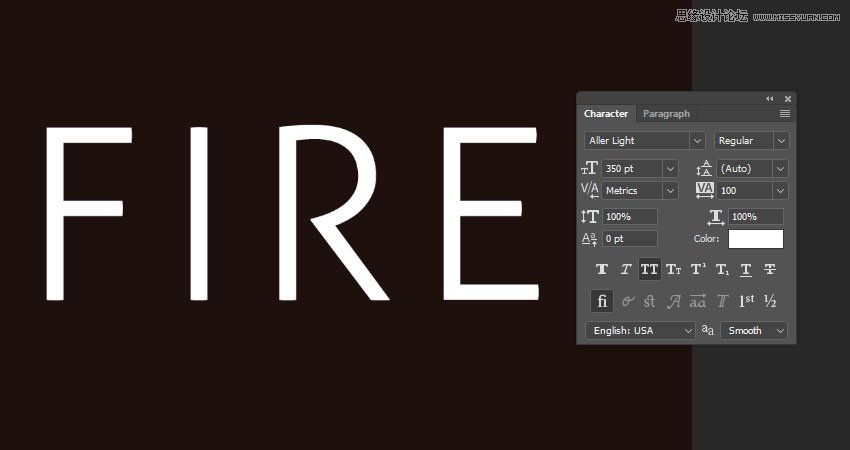
Create the text in All Caps using the font Aller Light. Set the Size to 350 pt and the Tracking to 100.
2. How to Create a Stroke Path and Layer
Step 1
Right-click the text layer and choose Create Work Path.

Step 2
Hide the text layer by clicking the eye icon next to it, and create a new layer with the name Stroke Flames.

3. How to Use the Flame Filter
Step 1
Go to Filter > Render > Flame, and click OK if you get a message telling you that the path is long.
Next, you'll be playing around with the different options and settings' values to stroke the path with flames, until you get an outcome you like.
The values used here are:
Basic
Flame Type: 2. Multiple Flames Along Path
Length: 115
Check the Randomize Length box.
Width: 35
Interval: 50
Check the Adjust Interval for Loops box.
Quality: High (Slow)

Advanced
Turbulent: 35
Jag: 20
Opacity: 50
Flame Lines (Complexity): 29
Flame Bottom Alignment: 20
Flame Style: 2. Violent
Flame Shape: 5. Pointing
Check the Randomize Shapes box.
Click OK to apply the filter. It might take some time, so just wait a little bit for it to be rendered.

Step 2
When you like the outcome, pick the Direct Selection Tool (A) and hit the Return key to get rid of the work path.

 愛你不要你
愛你不要你
-
 Photoshop制作復(fù)古風(fēng)格的老照片效果【英】2018-04-23
-
 Photoshop合成長著創(chuàng)意大樹的長頸鹿【英】2018-04-23
-
 Photoshop合成冰凍特效的金魚場景【英】2018-02-10
-
 Photoshop合成夢幻風(fēng)格的森林場景【英】2018-02-10
-
 Photoshop合成正在施法的巫師【英】2018-02-10
-
 Photoshop制作金屬質(zhì)感的3D立體字【英】2018-01-09
-
 Photoshop設(shè)計火焰燃燒藝術(shù)字教程【英】2018-01-09
-
 Photoshop制作復(fù)古花朵組成的藝術(shù)字【英】
相關(guān)文章3802018-01-09
Photoshop制作復(fù)古花朵組成的藝術(shù)字【英】
相關(guān)文章3802018-01-09
-
 Photoshop制作毛茸茸的圣誕節(jié)字體【英】
相關(guān)文章8882017-12-16
Photoshop制作毛茸茸的圣誕節(jié)字體【英】
相關(guān)文章8882017-12-16
-
 Photoshop合成創(chuàng)意的英雄戰(zhàn)斗場景教程【英】
相關(guān)文章5802017-12-12
Photoshop合成創(chuàng)意的英雄戰(zhàn)斗場景教程【英】
相關(guān)文章5802017-12-12